

Public channel
Anyone in the workspace can find and join it. Use for open, shared topics.
Channels are where conversations live in Sonar. A channel groups the people, messages, files and calls for a topic, a team, or a customer. One-to-one conversations are Direct Messages. Both appear in the left navigation.
Public channel
Anyone in the workspace can find and join it. Use for open, shared topics.
Private channel
Invite-only and hidden from people who aren’t members. Use for restricted conversations. It shows a lock icon in the list.
Direct message
A one-to-one conversation with another person, listed under Direct Messages.
Selecting a channel opens its conversation: the message thread in the middle, a composer at the bottom, and a details panel on the right for the channel’s Files, Channel info and Shared items. The header shows the channel name, participant count, and actions to add people, start a call, or open the channel menu.
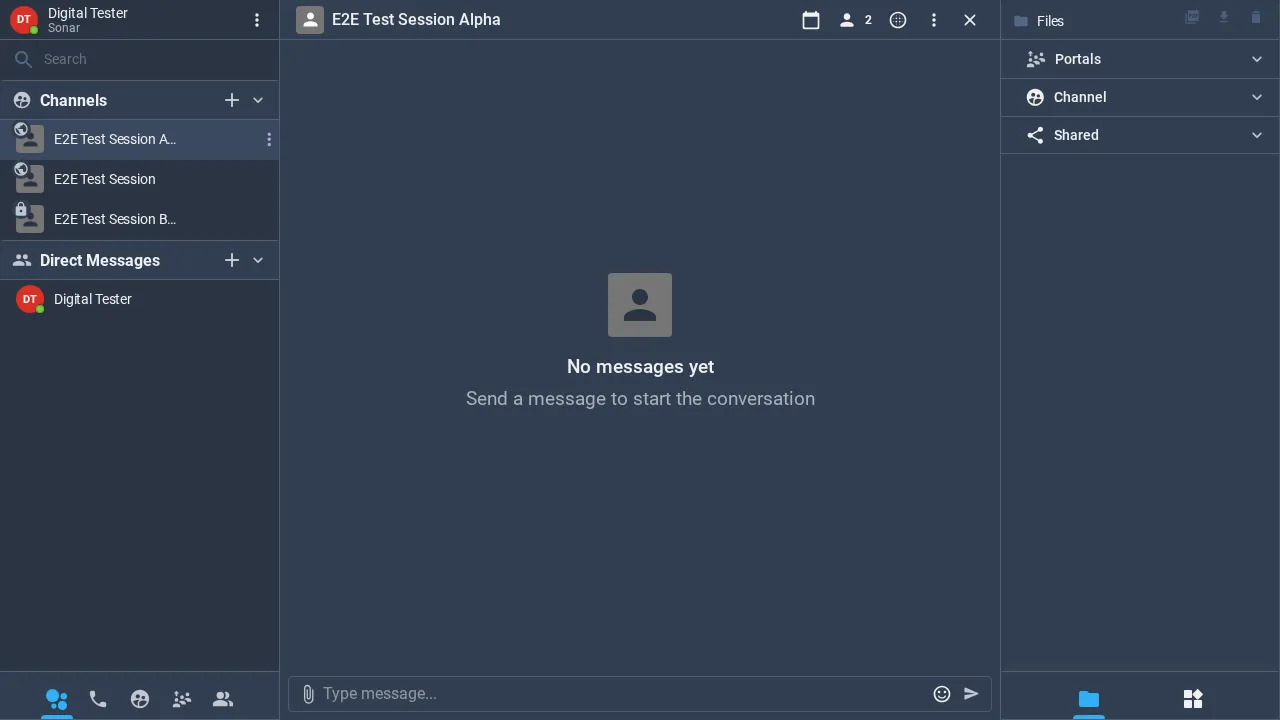
In the left navigation, click the + next to Channels (or Create Channel on your home dashboard).
Choose Public or Private, give the channel a name, and optionally add members.
Create it — the channel opens in its own window, ready for messages, files and calls.
Click the + next to Direct Messages and pick a person to open a private one-to-one conversation.
Every channel keeps its own message history and files. Open the Files section in the right-hand panel to browse everything shared in that channel, and use search at the top of the left navigation (with its date filter) to find past conversations.