

Meetings
A meeting is a scheduled video call. You pick a time, invite attendees, and Sonar creates a join link that everyone — including external guests — opens straight from their browser.
Planning a meeting
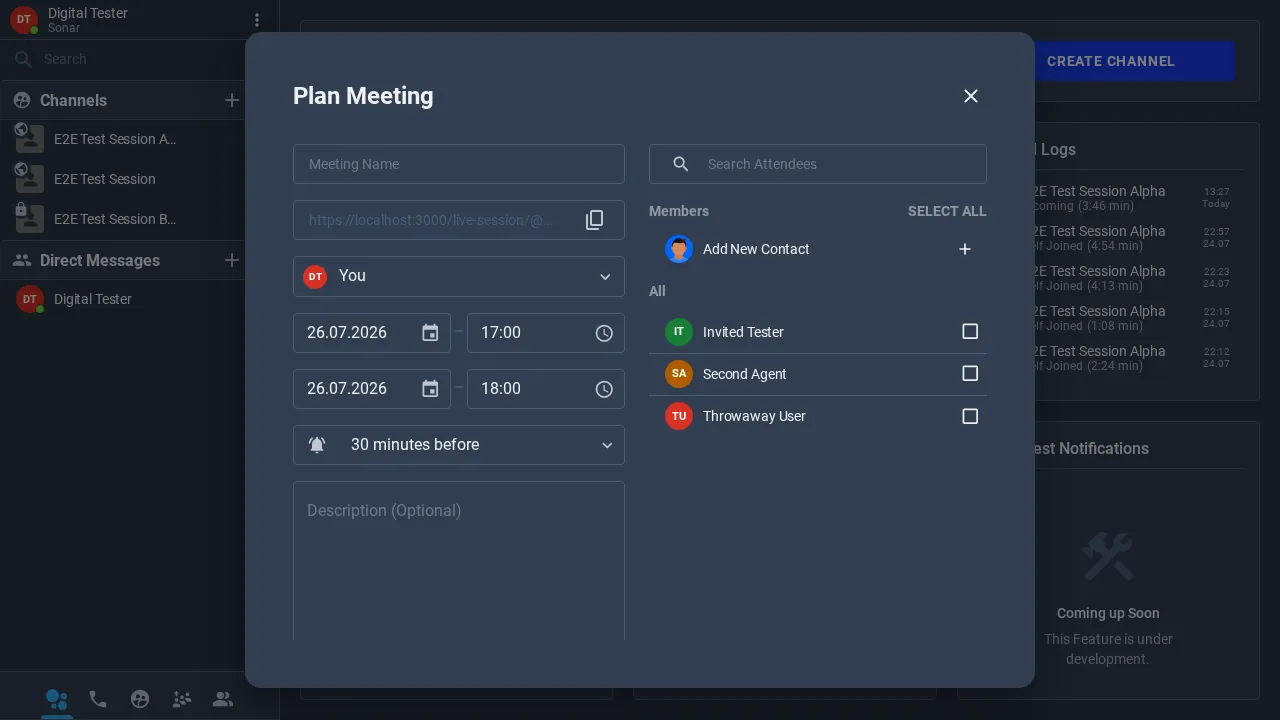
Click Plan Meeting (on your home dashboard, or from the + in the left navigation) to open the meeting form.
-
Give the meeting a name.
-
Set the start and end date and time, and choose a reminder (for example, 30 minutes before).
-
Add attendees from your members and contacts on the right — or Add New Contact to invite someone new. Add an optional description.
-
Copy the join link to share it, then create the meeting.
The meeting form fields
| Field | What it’s for |
|---|---|
| Meeting Name | The title attendees see. |
| Join link | The URL attendees open to join — copy and share it. |
| Host | Who runs the meeting (defaults to you). |
| Start / End | The scheduled window. |
| Reminder | When to notify attendees before it starts. |
| Description | Optional agenda or notes. |
| Attendees | Members and contacts to invite. |
Where meetings appear
Scheduled meetings show in the My Meetings panel on your home dashboard, split into Upcoming and past. Each entry links back to the meeting so you can review or join it.
Joining a meeting
Attendees open the join link at the scheduled time and enter a lobby before the call starts — no account or install needed for external guests. See For Participants for the guest side.